E4 — Multi-part assembly
Real structures repeat. A building has the same column on every grid line,
the same beam in every bay. Drawing each one from scratch — re-typing the
points, re-naming the groups — is how mistakes creep in. apeGmsh has a
better way: build a member once as a reusable Part, then stamp it
into the model as many times as you need, each copy carrying its own
addressable label.
This example builds a single column as a Part, drops three copies into one
session at different locations, gives each a different load, and reads each
one's deflection back by its label. The closed-form check is the
cantilever you already trust — $\delta = PL^3/3EI$ — applied three times,
once per stamped copy.
Units — mm, N, MPa
A Part round-trips through a CAD file (STEP) internally, so it's most
natural in CAD units. We stay in mm, N, MPa.
The problem
        col_A            col_B            col_C
       P=50 kN          P=100 kN         P=150 kN
         →                →  →             →  →  →
        ┌─┐              ┌─┐              ┌─┐
        │ │              │ │              │ │      each: 3 m tall,
        │ │              │ │              │ │      200×200 mm square,
        │ │              │ │              │ │      steel E = 200 GPa
       ▟███▙            ▟███▙            ▟███▙
       fixed            fixed            fixed
       x=0              x=2 m            x=4 m

  One Part template, stamped three times.
Three identical clamped columns, pushed sideways at the tip by three different loads. Each is a textbook cantilever, so each tip moves by
$$ \delta \;=\; \frac{P L^3}{3 E I}, \qquad I = \frac{a^4}{12}. $$
They're the same column — same height, same section — so the only thing that differs between them is the load. If the three deflections come back in the ratio 1 : 2 : 3 and each matches $PL^3/3EI$, the stamping preserved the geometry and the labels kept the three copies straight.
The whole model
The new ideas are Part (build once) and g.parts.add (stamp), plus
addressing each stamped copy by label all the way through to Results.
import numpy as np
from apeGmsh import apeGmsh, Part, Results
from apeGmsh.opensees import apeSees, OpenSeesModel
from apeGmsh.results.capture.spec import DomainCaptureSpec

# --- Problem data (mm, N, MPa) ---
L = 3000.0                         # column height
E, nu = 200_000.0, 0.3            # steel
G = E / (2 * (1 + nu))
a = 200.0                          # square section side
A = a * a
I = a**4 / 12.0                    # second moment (Iy = Iz, square)
J = 0.1406 * a**4                  # St-Venant torsion constant, square

# --- 1. Build ONE column as a reusable Part (a vertical line) ---
column = Part("column")
with column:
    base = column.model.geometry.add_point(0.0, 0.0, 0.0)
    top  = column.model.geometry.add_point(0.0, 0.0, L)
    column.model.geometry.add_line(base, top, label="shaft")
    column.model.sync()

# --- 2. Stamp it three times into one assembly, each at its own x ---
loads = {"col_A": 50_000.0, "col_B": 100_000.0, "col_C": 150_000.0}
with apeGmsh(model_name="assembly") as g:
    shaft_tags = []
    for i, x in enumerate([0.0, 2000.0, 4000.0]):
        inst = g.parts.add(column, label=f"col_{chr(65+i)}", translate=(x, 0.0, 0.0))
        shaft_tags += list(inst.entities.get(1, []))     # this instance's line(s)
    g.physical.add(1, shaft_tags, name="Columns")        # all shafts -> one element group

    g.mesh.sizing.set_global_size(L / 6.0)
    g.mesh.generation.generate(1)
    fem = g.mesh.queries.get_fem_data(dim=1)

# --- 3. One element declaration, per-instance supports and loads ---
ops = apeSees(fem)
ops.model(ndm=3, ndf=6)                                  # 3-D frame
transf = ops.geomTransf.Linear(vecxz=(1, 0, 0))
ops.element.elasticBeamColumn(pg="Columns", transf=transf, A=A, E=E, G=G, J=J, Iy=I, Iz=I)

# Each instance's base (lowest node) and tip (highest node), found by label.
base_ids, tip_ids = [], {}
for lbl in loads:
    sel = fem.nodes.select(label=lbl)
    ids = np.array([int(n) for n in sel.ids]); z = sel.coords[:, 2]
    base_ids.append(int(ids[np.argmin(z)]))
    tip_ids[lbl] = int(ids[np.argmax(z)])

ops.fix(nodes=base_ids, dofs=(1, 1, 1, 1, 1, 1))         # clamp all three bases
ts = ops.timeSeries.Linear()
with ops.pattern.Plain(series=ts) as pat:
    for lbl, P in loads.items():
        pat.load(node=tip_ids[lbl], forces=(P, 0, 0, 0, 0, 0))   # push each tip in +x

ops.constraints.Plain(); ops.numberer.Plain(); ops.system.BandGeneral()
ops.test.NormDispIncr(tol=1e-8, max_iter=10); ops.algorithm.Linear()
ops.integrator.LoadControl(dlam=1.0); ops.analysis.Static()

# --- 4. Capture each instance by label; read each back by label ---
spec = DomainCaptureSpec(opensees=ops)
for lbl in loads:
    spec.nodes(label=lbl, components=["displacement_x"], name=f"u_{lbl}")
with ops.domain_capture(spec, path="assembly.h5") as cap:
    cap.begin_stage("push", kind="static"); ops.analyze(steps=1); cap.step(t=1.0); cap.end_stage()

om = OpenSeesModel.from_h5("assembly.h5", fem_root="/model")
print(f"square section a={a:.0f} mm,  I={I:.3e} mm^4")
with Results.from_native("assembly.h5", model=om) as r:
    for lbl, P in loads.items():
        slab = r.nodes.get(label=lbl, component="displacement_x")
        d_fem = float(np.max(np.abs(slab.values[-1, :])))
        d_exact = P * L**3 / (3 * E * I)
        print(f"{lbl}: P={P/1e3:5.0f} kN   tip_FEM={d_fem:7.3f} mm   PL3/3EI={d_exact:7.3f} mm"
              f"   err={abs(d_fem-d_exact)/d_exact*100:.3f}%")
Run it. You should see:
square section a=200 mm,  I=1.333e+08 mm^4
col_A: P=   50 kN   tip_FEM= 16.875 mm   PL3/3EI= 16.875 mm   err=0.000%
col_B: P=  100 kN   tip_FEM= 33.750 mm   PL3/3EI= 33.750 mm   err=0.000%
col_C: P=  150 kN   tip_FEM= 50.625 mm   PL3/3EI= 50.625 mm   err=0.000%
Three copies, three loads, three exact deflections — 16.9, 33.8, 50.6 mm, in the clean 1 : 2 : 3 ratio of the loads, each landing on $PL^3/3EI$ to the last digit. The stamping reproduced the column perfectly, and the labels kept the three results from getting mixed up.
Step 1 — Build the column once, as a Part
column = Part("column")
with column:
    base = column.model.geometry.add_point(0.0, 0.0, 0.0)
    top  = column.model.geometry.add_point(0.0, 0.0, L)
    column.model.geometry.add_line(base, top, label="shaft")
    column.model.sync()
A Part is a self-contained geometry container with its own Gmsh
session — it knows nothing about the assembly it will end up in. You build it
exactly like a session model (column.model.geometry...), and you label
the pieces you'll want to address later. Here the column is a single vertical
line labelled "shaft".
When the with block closes, the Part quietly persists itself (to a STEP
file with a sidecar of label positions). That's what lets it be re-imported
— possibly many times — into a session. The label "shaft" travels with it.
A Part is a template, not an instance
Nothing is placed in a model yet. Think of column as a rubber stamp:
defined once, inked as many times as you like. It can hold lines (as
here) or solids (add_box, add_cylinder, …) — anything you'd draw in
a session.
Step 2 — Stamp it three times
for i, x in enumerate([0.0, 2000.0, 4000.0]):
    inst = g.parts.add(column, label=f"col_{chr(65+i)}", translate=(x, 0.0, 0.0))
    shaft_tags += list(inst.entities.get(1, []))
g.physical.add(1, shaft_tags, name="Columns")
g.parts.add(column, label=..., translate=...) imports the Part into the
session at an offset, and — crucially — prefixes its labels with the
instance label. Stamp it as "col_A" and the column's "shaft" becomes
"col_A.shaft"; the instance as a whole is addressable as "col_A". Three
add calls, three independent copies at x = 0, 2, 4 m, each with its own
namespace.
Each add returns an Instance whose .entities dict gives the geometry
tags it created. We collect every instance's line (entities[1]) into one
physical group "Columns" — because all three share the same section,
they'll be one element declaration. (The per-instance labels still live
alongside this group; we'll use them on the read side.)
Labels for reading, a physical group for the element
The typed bridge declares elements by physical group (pg=), so the
shafts go into one "Columns" group. The labels (col_A, col_B,
col_C) are what survive to Results — that's how we pull each stamped
column's answer back out separately. Two namespaces, two jobs.
Step 3 — One element, per-instance supports and loads
ops.element.elasticBeamColumn(pg="Columns", transf=transf, A=A, E=E, G=G, J=J, Iy=I, Iz=I)

for lbl in loads:
    sel = fem.nodes.select(label=lbl)
    ids = np.array([int(n) for n in sel.ids]); z = sel.coords[:, 2]
    base_ids.append(int(ids[np.argmin(z)]))
    tip_ids[lbl] = int(ids[np.argmax(z)])

ops.fix(nodes=base_ids, dofs=(1, 1, 1, 1, 1, 1))
One elasticBeamColumn over "Columns" writes every column element at once
— the whole assembly's frame in a single line, because they share a section.
(This is a 3-D model, ndm=3, ndf=6, so the section needs Iy, Iz, G,
J as well as A, E.)
The supports and loads, though, are per instance — so we find each
column's base and tip by selecting its label and picking the lowest and
highest node. fem.nodes.select(label="col_A") returns just that copy's
nodes; argmin/argmax on the $z$-coordinate gives base and tip. We clamp
all three bases at once and, in the pattern, push each tip with its own load.
Step 4 — Read each copy back, by label
spec = DomainCaptureSpec(opensees=ops)
for lbl in loads:
    spec.nodes(label=lbl, components=["displacement_x"], name=f"u_{lbl}")
...
for lbl, P in loads.items():
    slab = r.nodes.get(label=lbl, component="displacement_x")
    d_fem = float(np.max(np.abs(slab.values[-1, :])))
This is the payoff of stamping with labels. We declare one capture record
per label, and read each one back the same way:
r.nodes.get(label="col_A", ...) returns only col_A's nodes, blind to the
other two copies. The labels we stamped in Step 2 flowed all the way through
meshing, solving, and capture — so on the read side each column is a
first-class, independently addressable object. We take each one's max
$|u_x|$ (the tip) and check it against $PL^3/3EI$.
See it
import matplotlib
matplotlib.use("Agg")
import matplotlib.pyplot as plt

coords = np.asarray(r.model.fem.nodes.coords)
nid_row = {int(n): i for i, n in enumerate(r.model.fem.nodes.ids)}
fig, ax = plt.subplots(figsize=(6.5, 4.4))
for lbl, color in zip(loads, ["#1f77b4", "#ff7f0e", "#2ca02c"]):
    slab = r.nodes.get(label=lbl, component="displacement_x")
    z  = np.array([coords[nid_row[int(n)], 2] for n in slab.node_ids])
    x0 = np.array([coords[nid_row[int(n)], 0] for n in slab.node_ids])
    order = np.argsort(z)
    ax.plot(x0[order] + slab.values[-1, order] * 8, z[order], "-o", ms=3,
            color=color, label=f"{lbl}  (P={loads[lbl]/1e3:.0f} kN)")
ax.set_xlabel("x  [mm]  (deflection ×8)"); ax.set_ylabel("height z  [mm]")
ax.set_title("Three stamped columns, deflected by their own loads")
ax.legend(); ax.grid(alpha=0.3); fig.tight_layout()
fig.savefig("assembly-columns.png", dpi=120)
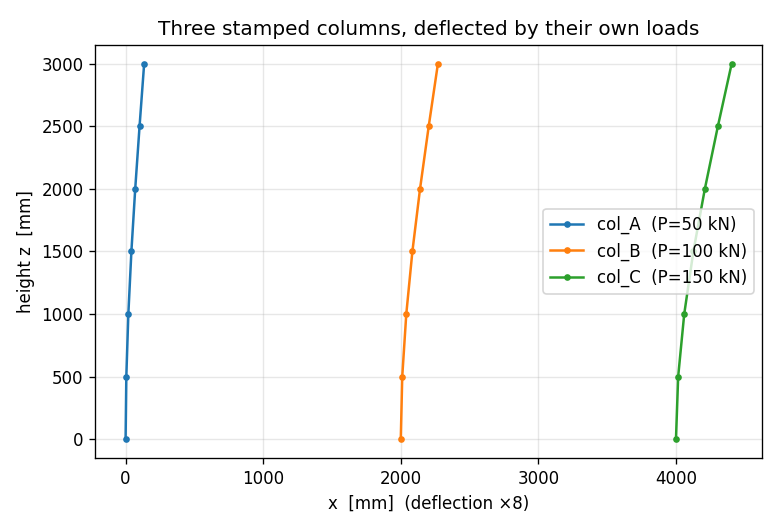
There they are — the same column, three times, each leaning by an amount set
by its load, drawn straight from its label's slab. (results.show_web()
gives the interactive 3-D version in a notebook.) Stamp once, read each
copy by name.
What you just learned
You built a member once and reused it without copy-paste:
- A
Partis a reusable template — its own little geometry session, built and labelled once, then persisted so it can be stamped repeatedly. g.parts.add(part, label=, translate=)stamps an instance and namespaces its labels under the instance label (col_A.shaft). Eachaddreturns anInstancewhose.entitiesgive the new geometry tags.- Two namespaces, two jobs. Collect shafts into a physical group for the
element declaration (
pg="Columns"); use the per-instance labels to address supports, loads, and — above all — results. - Labels survive end to end.
fem.nodes.select(label="col_A")andr.nodes.get(label="col_A", ...)pull one stamped copy's nodes out of the assembly, so each instance is independently addressable. - The check is the cantilever, three times: 16.9, 33.8, 50.6 mm, each exactly $PL^3/3EI$.
Where next
- Tie non-matching meshes — when stamped parts touch, join their (possibly mismatched) meshes with a tie that the bridge emits for you.
- STEP import: plate with a hole — import a Part's big sibling, a full CAD file, and name its faces by query.
- Compose modules (later) — assemble a model from whole saved
.h5modules instead of geometry Parts.